
The user is able to know Requirement test results through Test Case Execution history from each Test plan/cycle. To check Requirement test results, follow these steps:
-
Launch a Requirement issue
-
From the Test Cases section, click the ">" icon to expand the Test Case
-
Test plans that have executed the Test Cases will be listed; the colored blocks indicate the Test Case Execution result in each of its Test cycles in the plan
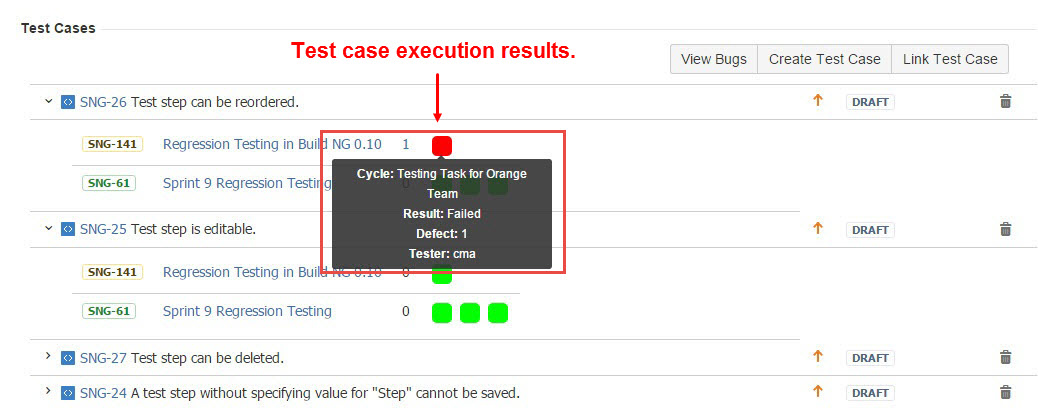
[Screenshot - UG0014_Requirement_issue_Test_Result]
To view bugs raised from associated Test Cases, follow these steps:
-
Launch a Requirement issue
-
From the Test Cases section, click the "View Bugs" button
-
All bugs raised from associated Test Cases will be present
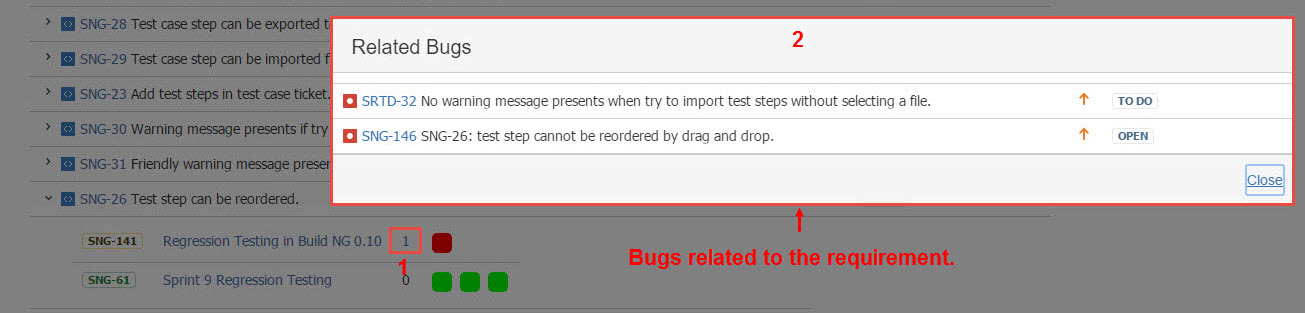
[Screenshot - UG0015_Requirement_issue_Bugs]