
If you are using the older version of synapseRT, and are upgrading to synapseRT 8.x, please follow Upgrade instructions carefully!
If there is a newer version released to Atlassian Marketplace, you can upgrade your add-on using the following:
-
Login to JIRA as a system administrator, then click the "COG" icon in the top right corner of the page and select "Add-ons"
-
Select "Add-ons" from the administration menu, then click the “Manage add-ons” link from the left panel
-
Find the synapseRT NextGen add-on from the list, then click it
-
Click the “Upgrade” button
-
Once the upgrade process is done, installation of the latest version is complete
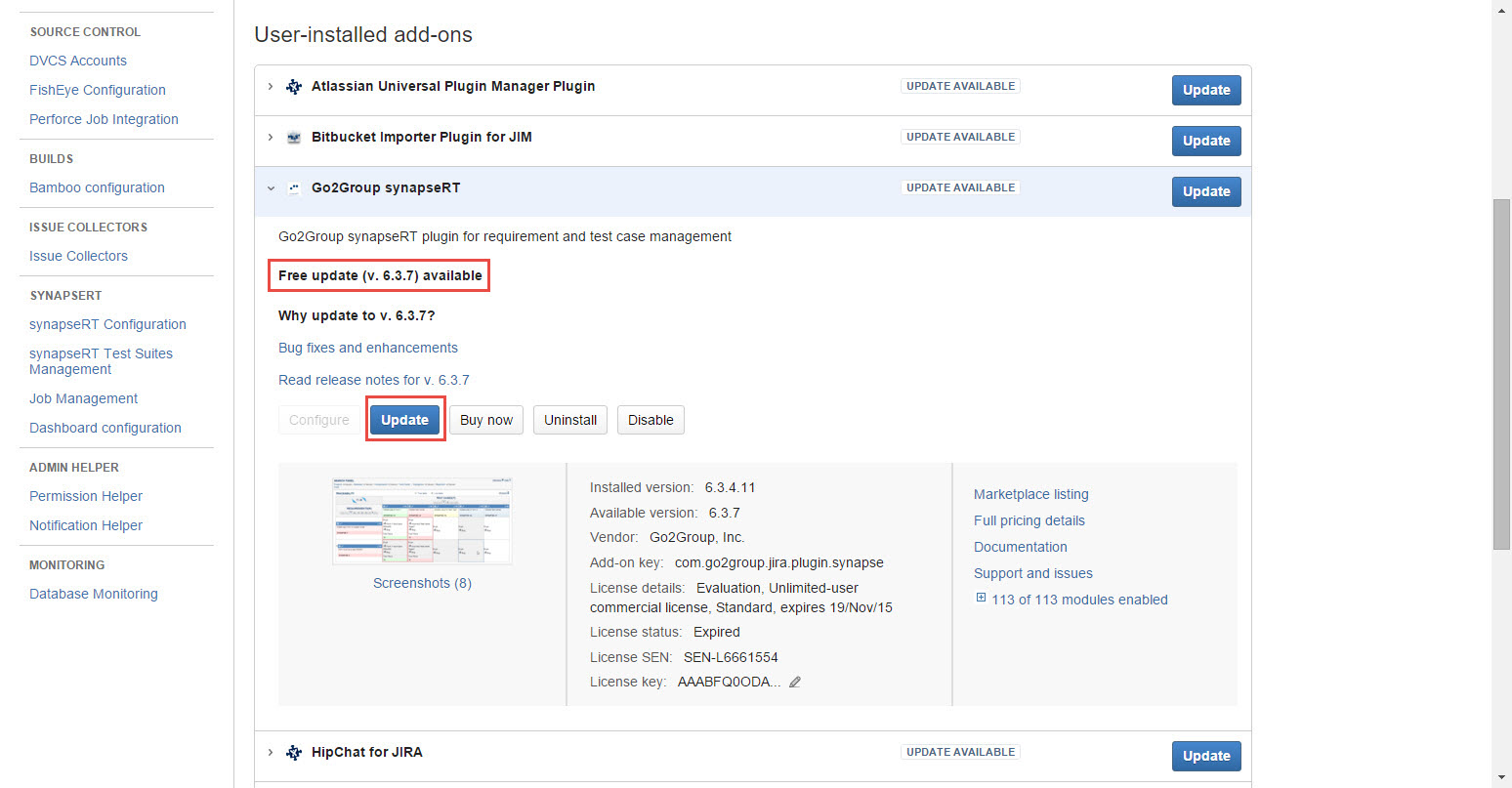
[Screenshot - IN0004_Upgrade_to_Newer_Version]
Upgrade synapseRT (version JIRA 7.x) to synapseRT NextGen (version 8.x to 8.4.3.1)
Upgrade synapseRT (version JIRA 6.x) to synapseRT NextGen (version 8.4.0.0)
-
It is highly recommended to perform this migration and verify data on your stage before doing this on production
-
It is highly recommended to take a backup of your JIRA instance before performing this task
-
It is highly recommended to perform this task only during offline hours when no one is using the application
-
Please contact support@go2group.com if you encounter any issues and need our assistance
-
If you want to upgrade synapseRT (version 7.x) to synapseRT NextGen (version 8.5.1 and higher), you need take the path: v7.x -> v8.4.x -> Migration (Data) -> v8.5.x and higher
-
Before installing synapseRT NextGen to your JIRA server:
1). Check if you have other issue types mapped to "Test Case" and "Test Plan" in synapseRT. If you do, convert the tickets to Test Case and Test Plan issue types; for help with this, please refer to "Moving an issue
."
2). Check if you have multiple issue types mapped to "Bug" in synapseRT. If you do, you need to combine them into one. You can convert other bugs in different issue types to the one you want to keep; for help with this, please refer to "Moving an issue
."
Note: From v8.4.0.1 on towards, we support mapping multiple issue types to "Bug". So it is not necessary to convert issue types from this version in order to do migration. Just do same issue type mapping settings and start your migration.
3). Check and update the synapseRT configuration from "Administration->Add-ons->SYNAPSERT->synaspeRT Configuration->Issue Types" with the following:-
Select "Test Case" as Test Case issue type
-
Select "Test Plan" as Test Plan issue type
-
Leave only one issue type as Bug issue type
-
Note down mapping values for Requirement issue type
4). Check if any JIRA services are configured for synapseRT (prior to version 8.0) e.g 'Synapse Bonfire Service'. If you do, you need remove these JIRA services manually:
-
Log in as a user with the JIRA System Administrator permission
-
Choose Administration > System
-
Select Advanced > Services to open a page showing all the configured services
-
Click the Delete link associated with the service you wish to remove
-
-
Make sure your JIRA server has already been upgraded to JIRA 7.x; please refer to synapseRT NextGen supported JIRA versions
-
Install synapseRT NextGen to your JIRA server; please refer to "Installation guide"
-
Update synapseRT NextGen configuration settings from "Administration->Add-ons->SYNAPSERT->Configuration" with the following:
a. Set the same value as is in synapseRT for "Requirement" mapping
b. Set the same value as is in synapseRT for Bug -
Complete the migration process by following these steps:
a. Go to "Administration->Add-ons->SYNAPSERT->Migration"
b. Click the "Migrate" button and wait until the migration process is complete -
As workflows created from old synapseRT (prior to version 8.0) are no more required by synapseRT NextGen, we request to remove the Postfunctions offered by old SynapseRT from your workflows or assign any newly created workflow or JIRA default workflow to them. Otherwise you may face an error 'Could not load FunctionProvider class' when you execute your workflow actions.
Changes are made once the upgrading and migration are complete
Issue types change
|
In synapseRT |
In synapseRT NextGen |
Comments |
|---|---|---|
|
Requirement |
Requirement |
|
|
Mapped Issue Types |
Mapped Issue Types |
|
|
Bug |
Bug |
|
|
Mapped Issue Types |
Mapped Issue Type |
|
|
Test Case |
Test Case |
|
|
Mapped Issue Type |
|
|
|
Test Plan |
Test Plan |
|
|
Mapped Issue Type |
|
|
|
SubRequirement |
SubRequirement |
|
|
SubTest |
SubTest |
|
Entities/fields change inside different issue types
|
Entity/Field |
In synapseRT |
In synapseRT NextGen |
Description |
||
|---|---|---|---|---|---|
|
Type |
Name |
Type |
Name |
||
|
Requirement |
Custom field |
Parent |
Section |
Requirements |
|
|
Custom field |
Test Case |
Section |
Test Cases |
|
|
|
Custom field |
Test Case Coverage TAB |
|
|||
|
Custom field |
Bugs TAB |
|
|||
|
Menu |
More/Create Test Case |
Section/Button |
Create Test Case |
|
|
|
Menu |
More/Create Bug |
|
|||
|
SubRequirement |
|
||||
|
Test Case |
Custom field |
Requirement |
Section |
Requirement |
|
|
Custom field |
Test Suite (Project) |
Section |
Test Suite |
|
|
|
Custom field |
Test Suite (Global) |
Section |
Test Suite |
|
|
|
Custom field |
Test Case State |
|
|||
|
Custom field |
Test Case Steps:
|
Section |
Test Steps:
|
|
|
|
Custom field |
Test Case Results |
|
|||
|
Section |
Sub-Tasks (SubTest) |
Section |
Sub-Tasks (SubTest) |
|
|
|
Custom field |
Test Plans TAB |
Section |
Test Plan |
|
|
|
Custom field |
Issue Coverage TAB |
Section |
Test Plan |
|
|
|
Custom field |
Requirement TAB |
Section |
Requirement |
|
|
|
Menu |
More/Create Bug |
|
|||
|
SubTest |
|
||||
|
Test Plan |
Custom field |
Test Case (SubTest Disabled) |
Section |
Test Case
|
|
|
Custom field |
Test Case (SubTest Enabled) |
Section |
Test Case
|
|
|
|
Custom field |
Test Plan State |
|
|||
|
Custom field |
Test Cases TAB |
Test Cycle |
|
||
|
Bug |
Custom field |
Test Case |
Section |
Test Case |
|
|
Custom field |
Requirement |
Section/Field |
Test Case/Requirement |
|
|
|
Custom field |
Test Cases TAB |
|
|||
|
Custom field |
Requirement TAB |
|
|||
|
Configuration |
Menu |
synapseRT Configuration/Custom Fields TAB |
Menu |
|
|
|
Menu |
synapseRT Configuration/Issue Types TAB |
Configuration/Issue Type Mapping |
|
||
|
Menu |
synapseRT Configuration/Advanced Settings TAB |
|
|||
|
Menu |
synapseRT Test Suites Management |
|
|||
|
Menu |
Job Management |
|
|||
|
Menu |
Dashboard Configuration |
|
|||
|
synapseRT |
Main Menu |
synapseRT |
|
||