
You can clone a single Test Case when you view a list of Test Cases from Test suite. It saves user's time for Test Case creation.
To clone a single Test Case from a Test Suite, follow these steps:
-
Click the 'Edit' icon from a 'Root Test Suite'
-
Expand a Test Suite from which the Test Case is supposed to be cloned
-
Click 'Clone Test Case' icon following the Test Case
-
From 'Clone Test Case' pop up window, specify a new name for the cloned Test Case.
-
Choose to clone any of below additional information for your Test Case:
1) Attachments
2) Sub Tasks
3) Links
4) Link Requirements
5) Link Test Suites -
Click 'Clone' button.
Once the clone is done, the new created Test Case will present in the current Test Suite.
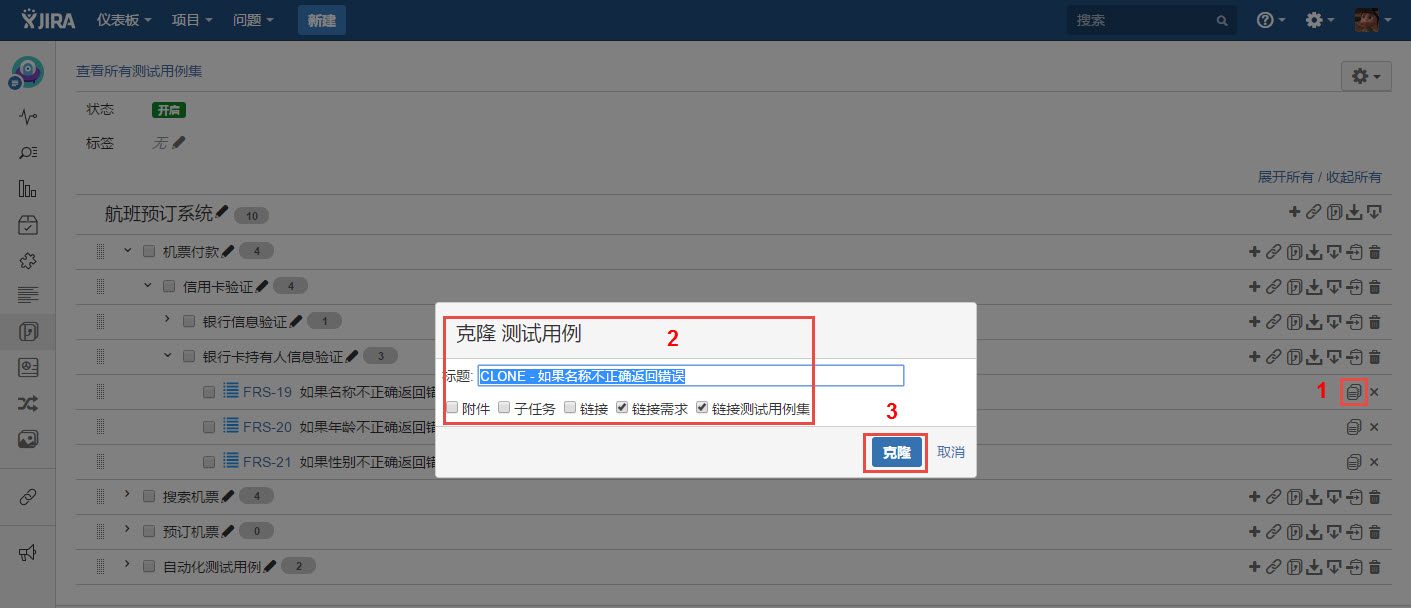
[Screenshot - UG0048_v86_Test_Suite_Panel_Clone_Single_Test_Case]