
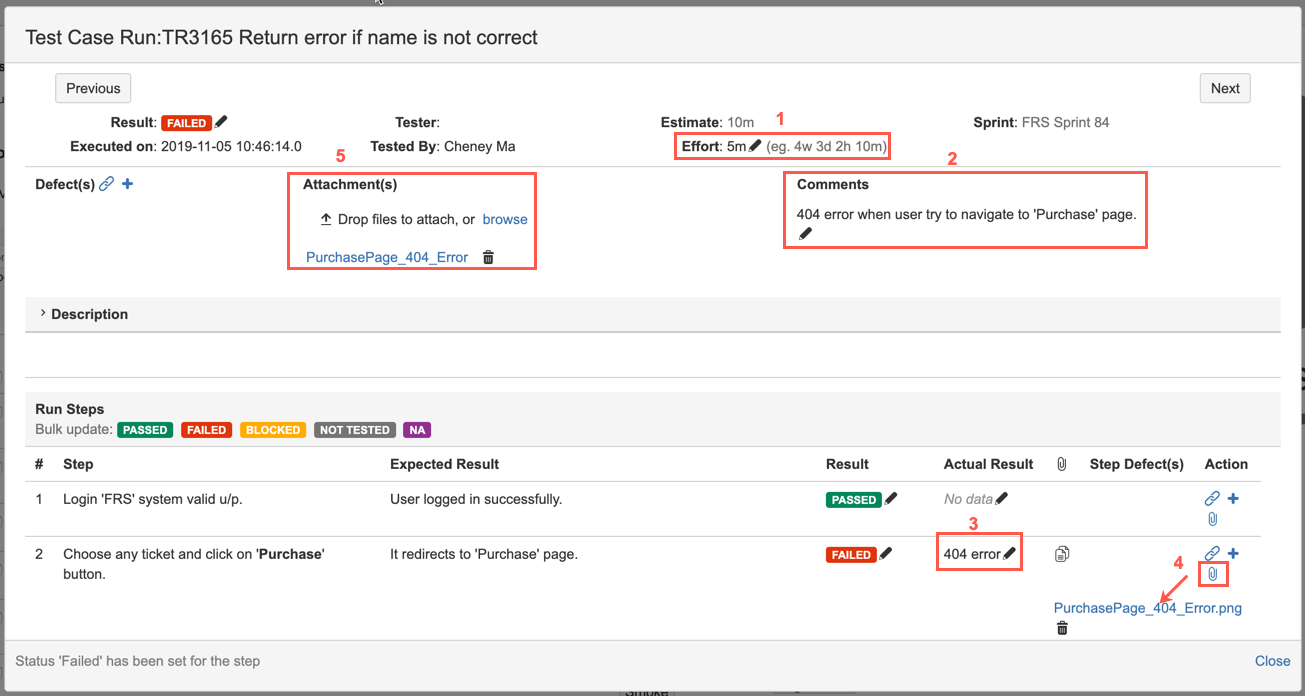
Besides to identify result and create/link defect for Test Run/Step, user is also allowed to add additional execution information as below:
-
Effort: the actual time spent on test execution
-
Comments: texts comments or notes for the test execution
-
Actual Result: texts description on actual result for the step execution
-
Attachment (Test Step): attachment for the step execution, it could be a screenshot or log file to give more information for the step execution.
Note: The maximum attachment size is same as JIRA 'Attachment Size' setting, you can configure it from: JIRA ADMINISTRATION->System->Attachments. -
Attachment(s) (Test Run): attachment for the test execution (Test Run level), it could be a screenshot or log file to give more information for the overall test execution.
Note: The maximum attachment size is same as JIRA 'Attachment Size' setting, you can configure it from: JIRA ADMINISTRATION->System->Attachments.-
Drag and drop files to Test Run dialog.
-
Use 'Copy & Paste', the file content in 'Clipboard' can be pasted directly to Test Run.
-
Click 'browse' link and then select multiple files to attach.
-
You can use "Copy & Paste" to add screenshot into 'Comments' or 'Actual Result' text boxes.
-
The screenshot pasted in 'Comments' field, will be taken as a Test Run level attachment.
-
The screenshot pasted in 'Actual result' field, will be taken as a Test Step level attachment.
-
-
Covered Requirements: select the requirement/s to be tracked as part of this Test Run, test result will be attached to any selected requirement/s
[Screenshot - UG0054B_Test_Run_Additional_Execution_Information]